
Factory warranties generally cover infotainment hardware defects like a dead screen or a failed navigation module, but only within the stated warranty term. What they routinely deny are software compatibility problems, spill damage, and issues traced to aftermarket wiring. Extended plans can close that gap, but only if the contract explicitly names electronics or "high-tech" components rather than leaving them implied.
TL;DR:
- Factory warranties generally cover infotainment hardware failure but exclude software issues, compatibility problems, spill damage, and aftermarket modifications.
- Extended plans must explicitly include high-tech electronics and often cover systems like navigation, climate control, and driver-assist modules to be effective.
- Repair claims are more likely to succeed if owners document symptoms, request detailed inspection records, and track recurring issues before filing.
- Warranties typically deny damage caused by user error, liquid spills, physical impact, or unauthorized repairs, and technicians verify these factors during diagnostics.
- Infotainment systems tend to age faster than the vehicle itself, making software updates and coverage considerations crucial during vehicle shopping and ownership.
Table of Contents
- What Does Infotainment Warranty Coverage Actually Include?
- Why Do Warranties Deny Software and Compatibility Issues?
- How Do You Document and File an Infotainment Warranty Claim?
- Does an Extended Warranty Cover Infotainment Systems?
- How Rpmwarranty Structures Coverage for High-Tech Components
- The Reality Gap Between Software Lifespans and Warranty Terms
- Getting a Quote and Confirming Your Infotainment Coverage
- Sources
What Does Infotainment Warranty Coverage Actually Include?
A factory infotainment warranty typically protects the physical hardware inside your dashboard: the head unit, the touchscreen display, the navigation module, backup cameras, and the control modules that run them. If one of these parts fails on its own, through no fault of yours, most manufacturers treat that as a warrantable defect during the coverage window.
The tricky part is figuring out exactly how long that window lasts, because it varies by brand and by component category. Bumper-to-bumper coverage commonly runs a few years or a moderate number of miles, whichever occurs first, and infotainment hardware usually falls under that umbrella. Some manufacturers extend specific systems further. Hyundai's owner documentation, for example, outlines broader coverage windows220802.pdf?_variant=ddcpreview&adobe_mc=MCMID%3D05692786011798550963606690954076844126%7CMCORGID%3DC3BCE0154FA24300A4C98A1%2540AdobeOrg%7CTS%3D1666378110) that stretch to 5 years or 60,000 miles for certain systems, while emission-related electronics sometimes carry longer statutory terms tied to state and federal requirements.
Where things get genuinely complicated is on higher-end vehicles, where infotainment isn't a simple radio and screen. It's a networked system tied into climate control, driver-assist cameras, and sometimes the suspension settings.
- Range Rover models run their infotainment through the Pivi Pro system, which controls navigation, climate, and off-road terrain modes from one interface. When the screen freezes or the module loses connection to the vehicle's other systems, that's often a software or wiring diagnosis, not a simple screen swap.
- BMW vehicles equipped with iDrive have had recurring complaints about screen flickering and Bluetooth pairing drops, especially on models with the older iDrive 7 generation before software patches matured.
- Mercedes-Benz MBUX systems integrate voice control and augmented-reality navigation, and failures often show up as the digital instrument cluster going dark rather than the center screen itself.
- Porsche Communication Management units are known for occasional lag during map rendering, a fault dealers usually resolve with a firmware update rather than a parts replacement.
- Ford SYNC systems, particularly early SYNC 3 units, had well-documented freezing issues that led to a wave of warranty claims and software updates.
- Honda infotainment complaints tend to center on the touchscreen's response lag and occasional total blackouts, most commonly on models from the mid-2010s before Honda revised its display hardware.
Your owner's manual or warranty booklet is the actual source of truth here, not a dealer's verbal assurance. Genesis, for instance, publishes a detailed warranty information document that spells out exactly which systems fall under new-vehicle coverage and for how long. Look for a section listing "electrical" or "audio/multimedia" components specifically, because generic language about "mechanical parts" often excludes electronics by omission.
If you bought certified pre-owned, check whether that program extended or reset your infotainment coverage clock. CPO programs frequently add a year or two of coverage on top of the remaining factory term, but the fine print sometimes narrows what's included compared to the original new-vehicle warranty.
Why Do Warranties Deny Software and Compatibility Issues?
Here's the distinction that trips up most owners: a warranty covers defects in the vehicle as built, not the vehicle's ability to keep pace with outside technology. When your phone's new operating system won't sync with your car's Bluetooth, that's rarely treated as a hardware defect.
Manufacturers frequently classify these as technology limitations rather than warrantable failures, especially when the inability to connect traces back to a smartphone OS update rather than anything wrong with the car itself. A useful diagnostic question to ask your service department: does the fault reproduce on the vehicle alone, or only when paired with your personal device? If it only happens with your phone attached, that points to a compatibility classification, not a covered defect.
Customer-caused damage is the other major exclusion category, and it covers more ground than people expect:
- Liquid spills into the center console, even a small coffee splash that seeps behind the touchscreen bezel.
- Physical impact damage, like a cracked screen from a dropped tool during a DIY install.
- Unauthorized repairs or aftermarket wiring changes, including third-party stereo installs or hardwired dash cams.
- Corrosion from long-term moisture exposure, which technicians can usually date by the extent of oxidation.
Manufacturer policy bulletins get specific about this. Toyota's own bulletin on entertainment system warranty procedures treats these units as exchange components with defined exclusions for abuse and unauthorized repair, which gives dealers a clear script for denying claims tied to owner-caused damage.
Technicians inspect for specific physical evidence before approving or denying a claim. They check ports and connectors for corrosion, look for signs of liquid ingress inside the housing, and check whether seals have been broken or bypassed. Asurion's technical guidance notes that environmental and user-caused damage gets excluded far more often than owners assume, precisely because it's visually identifiable during teardown.
Pro Tip: Before any aftermarket installer touches your dashboard, ask whether the work requires cutting factory wiring. A clean plug-and-play install rarely voids infotainment coverage, but a hardwired modification often does, even on an unrelated failure months later.
How Do You Document and File an Infotainment Warranty Claim?
The gap between a claim that gets approved and one that gets denied often comes down to what's written on the repair order, not the actual severity of the fault.
- Record the symptom before your appointment. Take a video or screenshot of the exact failure, whether it's a frozen screen, a black display, or a navigation module that won't boot. Note the date and your odometer reading the moment it happened.
- Ask the service writer to log specifics. Insist the repair order records the software version, whether a technical service bulletin applies, and exactly which parts were inspected or replaced.
- Request a TSB and recall check by VIN. Many infotainment glitches are already documented issues with a known fix, and a matching TSB strengthens your claim considerably.
- Keep every repair order, even for "no fault found" visits. These build the repair history you'll need if the same issue reappears.
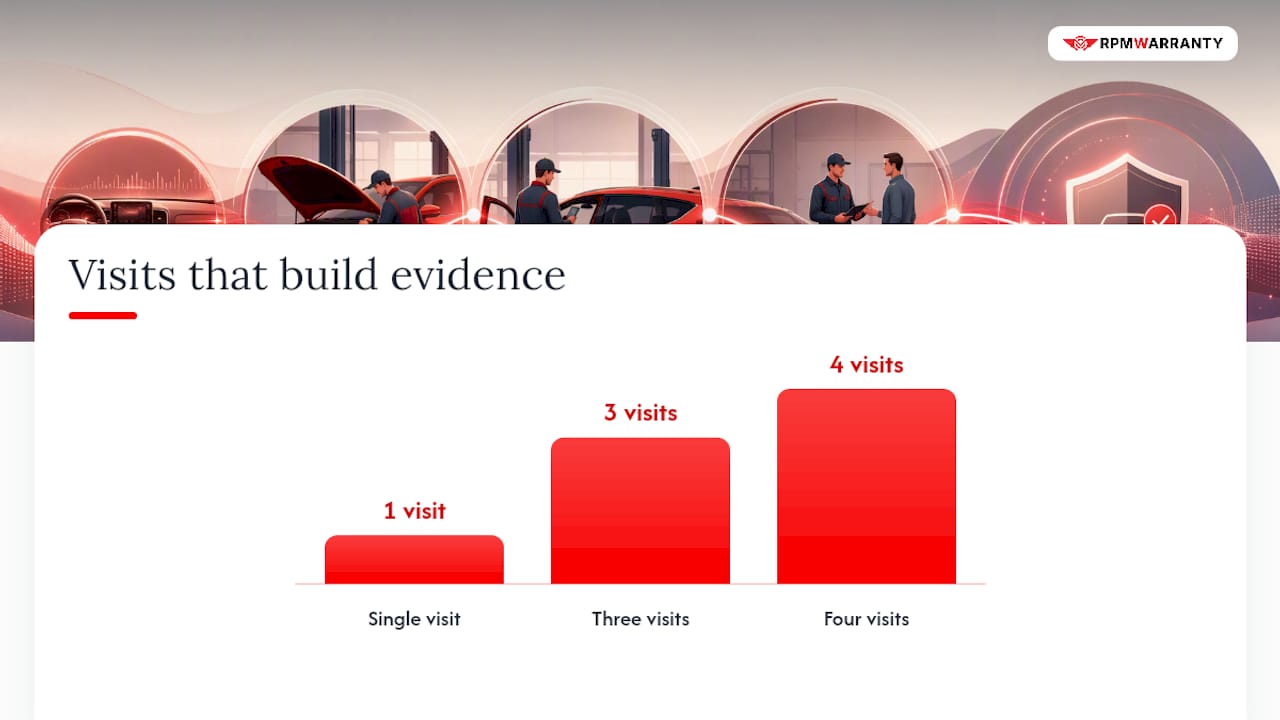
- Track the pattern if it recurs. A single visit rarely proves much, but three or four visits for the same unresolved fault starts to matter.
That repetition matters more than most owners realize. Consumer guidance on bumper-to-bumper coverage notes that electronics remain a repeated trouble spot even for warrantable defects, meaning a covered infotainment failure can still take multiple visits to actually resolve.
If your infotainment system substantially impairs vehicle use or safety, backup camera failures are a common example, and it isn't fixed after a reasonable number of attempts, you may have consumer-rights remedies. State lemon laws generally require documented repair attempts before a claim qualifies, which is exactly why the paper trail from steps one through four matters so much.
Does an Extended Warranty Cover Infotainment Systems?
Extended warranties, also called vehicle service contracts, don't automatically cover infotainment just because they sound comprehensive. Coverage depends entirely on how the contract defines "electrical systems" or "high-tech electronics," and that language varies enormously between providers and tiers.
Before you buy, ask to see the exact component list in writing. Contracts that specifically name a "head unit," "infotainment module," or "navigation module" give you something concrete to point to during a claim dispute. Vague references to "electrical components" without a defined list leave far more room for a denial.
Things worth confirming in the plan terms:
- Whether software-related failures are explicitly excluded, separate from hardware failures.
- Whether preexisting-condition language could apply if you had any electronics issue before the contract started.
- The deductible structure per repair visit versus per claim.
- Any caps on claim payouts for individual high-tech components.
Plan tiers matter here more than most buyers expect. Entry-level tiers often cover core mechanical systems, engine, transmission, basic electrical, while leaving high-tech electronics as an add-on or excluding them outright. Premium tiers tend to fold infotainment, navigation, and driver-assist electronics into the base coverage. A failed backup camera module on a Range Rover might be denied under a basic plan but approved without question under a plan that names "advanced electronics" as a covered category.
Pro Tip: Do quick math before buying: if a Mercedes MBUX head unit replacement runs into four figures and your vehicle is aging out of factory coverage, a plan premium that costs a fraction of that single repair usually pays for itself the first time you need it.
How Rpmwarranty Structures Coverage for High-Tech Components
The company offers several coverage tiers with broader plans emphasizing protection for high-tech electronics rather than treating them as an afterthought. That structure matters for infotainment specifically, since these are exactly the components that entry-level plans in the industry tend to gloss over.
Getting covered typically involves consultation, plan selection based on budget and risk tolerance, customization for specific vehicle details, and a final agreement. The provider also offers free quotes, nationwide repairs, and a streamlined claims process.
When you talk to an agent, ask them directly to:
- Confirm which infotainment components are named in the contract, not just implied.
- Clarify whether software-related exclusions apply the same way they do under factory warranties.
- State the deductible per repair visit for electronics claims specifically.
Getting those three answers in writing before you sign is what separates a plan that actually pays out from one that leaves you arguing over definitions later.
The Reality Gap Between Software Lifespans and Warranty Terms
Infotainment systems age faster than engines or transmissions, and that's the uncomfortable truth most warranty conversations skip. A screen might work perfectly for a decade, but the moment your phone's operating system moves past what the car's software can handle, you're left with a system that's mechanically fine and functionally outdated. No warranty, factory or extended, was ever designed to fix that kind of obsolescence.
The practical response is to update your infotainment software whenever the dealer offers it, document every strange glitch before it becomes a pattern, and think seriously about electronics coverage while you're still shopping for the vehicle, not after the screen goes dark. Run through the documentation checklist earlier in this piece before you decide whether an extended plan is worth the premium for your specific vehicle.
— Kenneth
Getting a Quote and Confirming Your Infotainment Coverage
If you're ready to find out exactly what an extended plan would cover on your vehicle, the process starts with three things: your VIN, your current mileage, and a brief history of any infotainment issues you've already noticed. Having those ready before you call means the quote you get back actually reflects your car, not a generic estimate.
Once you're on the phone or filling out the form at Rpmwarranty, push the agent for specifics rather than general reassurance. Ask them to show you the actual contract language for "infotainment," "navigation," "head unit," or "high-tech electronics," and get a clear answer on how the deductible applies to an electronics claim versus a mechanical one. If you drive a Volkswagen, Rpmwarranty's Volkswagen-specific plan guidance breaks down how coverage typically maps to that platform's known trouble spots.
Before you commit, weigh the plan's cost against what a single infotainment repair would realistically run on your make and model. For a lot of owners driving tech-heavy vehicles, that comparison alone answers the question of whether coverage is worth it. Request your free quote and get the exact terms in writing before you decide.